Unit 4: Transaction Management
Syllabus
- Unit 4: Transaction Management
- Transaction Control Commands
- Transaction Management
- Transaction Concepts
- Properties of Transaction
- Serializabity of transactions
- Two-Phase Commit Protocol
- Deadlock
- Deadlock Avoidance
- Deadlock Detection
- Two-Phase Locking Protocol
- Cursors
- Stored Procedures
- Stored Function
- Trigger
- References
Transactions
Transactions are a set of operations used to perform a logical set of work. It is the bundle of all the instructions of a logical operation. A transaction usually means that the data in the database has changed. One of the major uses of DBMS is to protect the user's data from system failures. It is done by ensuring that all the data is restored to a consistent state when the computer is restarted after a crash.
Any logical work or set of works that are done on the data of a database is known as a transaction. Logical work can be inserting a new value in the current database, deleting existing values, or updating the current values in the database.
Transaction Control Commands
In a Relational Database Management System (RDBMS), the Structured Query Language (SQL) is used to perform multiple operations to store, retrieve and manipulate the data across various tables in a database. Let us consider few scenarios where we might have updated a record mistakenly and want to restore the data or we have inserted few records and want to save them, there Transaction Control Language (TCL) comes into the picture. The Transaction Control Language is used to maintain the integrity and consistency of the data stored in the database.
1.COMMIT
This command is used to make a transaction permanent in a database. So it can be said that commit command saves the work done as it ends the current transaction by making permanent changes during the transaction.
Here's an example using the "EMPLOYEE" table:
| EMP_ID | EMP_NAME | EMP_LOC |
| ------ | -------- | --------- |
| 1356 | Raju | Delhi |
| 2678 | Neeta | Bangalore |
| 9899 | Sanjay | Hyderabad |
-- Update the location of 'Raju' to 'Hyderabad'

UPDATE EMPLOYEE SET EMP_LOC = 'Hyderabad'  WHERE EMP_NAME = 'Raju';

COMMIT;
After the COMMIT command, the table is updated as follows:
| EMP_ID | EMP_NAME | EMP_LOC |
| ------ | -------- | --------- |
| 1356 | Raju | Hyderabad |
| 2678 | Neeta | Bangalore |
| 9899 | Sanjay | Hyderabad |
2.ROLLBACK
This command is used to restore the database to its original state since the last command that was committed. The syntax of the Rollback command is as below:
ROLLBACK;
Also, the ROLLBACK command is used along with savepoint command to leap to a save point in a transaction. For example:
-- Incorrectly updated 'Raju' to 'Bangalore', now rollback to previous state

UPDATE EMPLOYEE SET EMP_LOC = 'Bangalore'  WHERE EMP_NAME = 'Raju';

ROLLBACK;
Before ROLLBACK:
| EMP_ID | EMP_NAME | EMP_LOC |
| ------ | -------- | --------- |
| 1356 | Raju | Bangalore |
| 2678 | Neeta | Bangalore |
| 9899 | Sanjay | Hyderabad |
After ROLLBACK:
| EMP_ID | EMP_NAME | EMP_LOC |
| ------ | -------- | --------- |
| 1356 | Raju | Hyderabad |
| 2678 | Neeta | Bangalore |
| 9899 | Sanjay | Hyderabad |
3.SAVEPOINT
The SAVEPOINT command is used to temporarily save a transaction. You can use it to rollback to a specific point in the transaction. Here's an example:
| ORDER_ID | ITEM_NAME |
| -------- | ---------- |
| 199 | TELEVISION |
| 290 | CAMERA |
-- Insert values and create savepoints

INSERT INTO ORDERS VALUES ('355', 'CELL PHONE');

COMMIT;

UPDATE ORDERS SET ITEM_NAME = 'SMART PHONE'  WHERE ORDER_ID = '355';

SAVEPOINT A;

INSERT INTO ORDERS VALUES ('566', 'BLENDER');

SAVEPOINT B;
After these commands, the "ORDERS" table looks like this:
| ORDER_ID | ITEM_NAME |
| -------- | ----------- |
| 199 | TELEVISION |
| 290 | CAMERA |
| 355 | SMART PHONE |
| 566 | BLENDER |
Now, you can use the ROLLBACK TO command to roll back to a specific savepoint. For example:
-- Rollback to savepoint A

ROLLBACK  TO A;
After the ROLLBACK TO A command, the "ORDERS" table will be:
| ORDER_ID | ITEM_NAME |
| -------- | ----------- |
| 199 | TELEVISION |
| 290 | CAMERA |
| 355 | SMART PHONE |
Transaction Management
A transaction is a logical unit of work performed on a database. They are logically ordered units of work completed by the end-user or an application.
A transaction is made up of one or more database modifications. Creating, updating, or deleting a record from a table, for example. To preserve data integrity and address database issues, it's critical to keep track of these transactions. We can bundle SQL queries together and run them as a single transaction
Transaction states
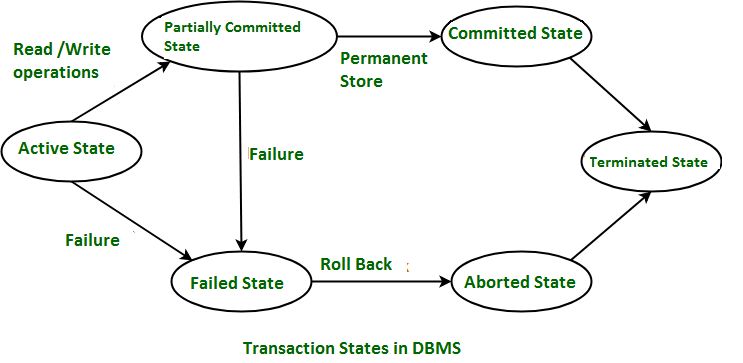
There are various database transaction states as follows.
-
Active state - this is the state in which a transaction execution process begins. Operations such as read or write are performed on the database.
-
Partially committed - means that a transaction is only partially committed once it has been completed.
-
Committed stage - After a transaction execution is completed successfully the transaction is in a committed state. All changes made to the database are permanently documented.
-
Failed state - If a transaction is aborted while in the active state, or if one of the checks fails, the transaction is in the failed state.
-
Terminated state - This state happens once the transaction leaving the system cannot be restarted once again.
Transaction Concepts
Transaction
-
The transaction is a set of logically related operation. It contains a group of tasks.
-
A transaction is an action or series of actions. It is performed by a single user to perform operations for accessing the contents of the database.
Example: Suppose an employee of bank transfers Rs 800 from X's account to Y's account. This small transaction contains several low-level tasks:
X's Account
-
Open_Account(X)
-
Old_Balance = X.balance
-
New_Balance = Old_Balance - 800
-
X.balance = New_Balance
-
Close_Account(X)
Y's Account
-
Open_Account(Y)
-
Old_Balance = Y.balance
-
New_Balance = Old_Balance + 800
-
Y.balance = New_Balance
-
Close_Account(Y)
Operations of Transaction:
Following are the main operations of transaction:
Read(X): Read operation is used to read the value of X from the database and stores it in a buffer in main memory.
Write(X): Write operation is used to write the value back to the database from the buffer.
Let's take an example to debit transaction from an account which consists of following operations:
-
1. R(X);
-
2. X = X - 500;
-
3. W(X);
Let's assume the value of X before starting of the transaction is 4000.
-
The first operation reads X's value from database and stores it in a buffer.
-
The second operation will decrease the value of X by 500. So buffer will contain 3500.
-
The third operation will write the buffer's value to the database. So X's final value will be 3500.
But it may be possible that because of the failure of hardware, software or power, etc. that transaction may fail before finished all the operations in the set.
For example: If in the above transaction, the debit transaction fails after executing operation 2 then X's value will remain 4000 in the database which is not acceptable by the bank.
To solve this problem, we have two important operations:
Commit: It is used to save the work done permanently.
Rollback: It is used to undo the work done.
Properties of Transaction
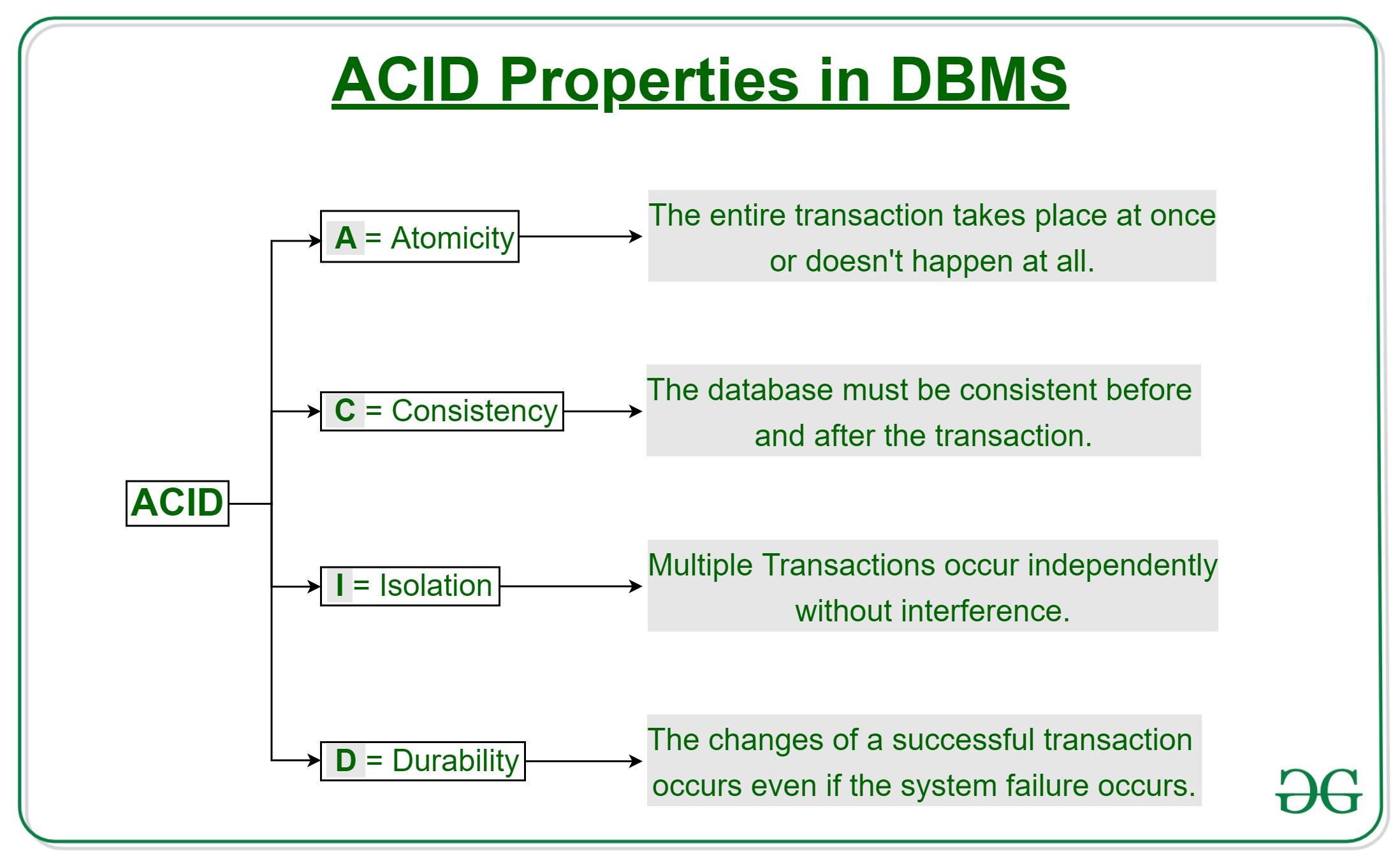
There are four main properties of a transaction represented in the acronym ACID. This referrs to Atomicity, Consistency, Isolation, and Durability.
-
Atomicity - A transaction cannot be subdivided and can only be executed as a whole and is treated as an atomic unit. It is either all the operations are carried out or none are performed.
-
Consistency - After any transaction is carried out in a database it should remain consistent. No transaction should affect the data residing in the database adversely.
-
Isolation - When several transactions need to be conducted in a database at the same time, each transaction is treated as if it were a single transaction. As a result, the completion of a single transaction should have no bearing on the completion of additional transactions.
-
Durability - From durable, all changes made must be permanent such that once the transaction is committed the effects of the transaction cannot be reversed. In case of system failure or unexpected shutdown and changes made by a complete transaction are not written to the disk, during restart the changes should be remembered and restored.
Serializabity of transactions
In the field of computer science, serializability is a term that is a property of the system that describes how the different process operates the shared data. If the result given by the system is similar to the operation performed by the system, then in this situation, we call that system serializable. Here the cooperation of the system means there is no overlapping in the execution of the data. In DBMS, when the data is being written or read then, the DBMS can stop all the other processes from accessing the data.
Thus, serializability is the system's property that describes how the different process operates the shared data. In DBMS, the overall Serializable property is adopted by locking the data during the execution of other processes. Also, serializability ensures that the final result is equivalent to the sequential operation of the data.
Types of Serializability
In DBMS, all the transaction should be arranged in a particular order, even if all the transaction is concurrent. If all the transaction is not serializable, then it produces the incorrect result.
In DBMS, there are different types of serializable. Each type of serializable has some advantages and disadvantages. The two most common types of serializable are view serializability and conflict serializability.
1. Conflict Serializability
-
Conflict serializability is a type of conflict operation in serializability that operates the same data item that should be executed in a particular order and maintains the consistency of the database. In DBMS, each transaction has some unique value, and every transaction of the database is based on that unique value of the database.
-
This unique value ensures that no two operations having the same conflict value are executed concurrently. For example, let's consider two examples, i.e., the order table and the customer table. One customer can have multiple orders, but each order only belongs to one customer. There is some condition for the conflict serializability of the database. These are as below.
-
Both operations should have different transactions.
-
Both transactions should have the same data item.
-
There should be at least one write operation between the two operations.
If there are two transactions that are executed concurrently, one operation has to add the transaction of the first customer, and another operation has added by the second operation. This process ensures that there would be no inconsistency in the database.
2. View Serializability
-
View serializability is a type of operation in the serializable in which each transaction should produce some result and these results are the output of proper sequential execution of the data item. Unlike conflict serialized, the view serializability focuses on preventing inconsistency in the database. In DBMS, the view serializability provides the user to view the database in a conflicting way.
-
In DBMS, we should understand schedules S1 and S2 to understand view serializability better. These two schedules should be created with the help of two transactions T1 and T2. To maintain the equivalent of the transaction each schedule has to obey the three transactions. These three conditions are as follows.
-
The first condition is each schedule has the same type of transaction. The meaning of this condition is that both schedules S1 and S2 must not have the same type of set of transactions. If one schedule has committed the transaction but does not match the transaction of another schedule, then the schedule is not equivalent to each other.
-
The second condition is that both schedules should not have the same type of read or write operation. On the other hand, if schedule S1 has two write operations while schedule S2 has one write operation, we say that both schedules are not equivalent to each other. We may also say that there is no problem if the number of the read operation is different, but there must be the same number of the write operation in both schedules.
-
The final and last condition is that both schedules should not have the same conflict. Order of execution of the same data item. For example, suppose the transaction of schedule S1 is T1, and the transaction of schedule S2 is T2. The transaction T1 writes the data item A, and the transaction T2 also writes the data item A. in this case, the schedule is not equivalent to each other. But if the schedule has the same number of each write operation in the data item then we called the schedule equivalent to each other.
Benefits of Serializability in DBMS
-
Predictable execution: In serializable, all the threads of the DBMS are executed at one time. There are no such surprises in the DBMS. In DBMS, all the variables are updated as expected, and there is no data loss or corruption.
-
Easier to Reason about & Debug: In DBMS all the threads are executed alone, so it is very easier to know about each thread of the database. This can make the debugging process very easy. So we don't have to worry about the concurrent process.
-
Reduced Costs: With the help of serializable property, we can reduce the cost of the hardware that is being used for the smooth operation of the database. It can also reduce the development cost of the software.
-
Increased Performance:In some cases, serializable executions can perform better than their non-serializable counterparts since they allow the developer to optimize their code for performance.
Two-Phase Commit Protocol
Two-phase commit (2PC) is a standardized protocol that ensures atomicity, consistency, isolation and durability (ACID) of a transaction; it is an atomic commitment protocol for distributed systems.
In a distributed system, transactions involve altering data on multiple databases or resource managers, causing the processing to be more complicated since the database has to coordinate the committing or rolling back of changes in a transaction as a self-contained unit; either the entire transaction commits or the entire transaction rolls back.
A transaction manager uses 2PC to ensure data integrity as well as the integrity of the global database -- the collection of databases participating in the transaction -- as well as monitor the commitment or rollback of the distributed transactions. This protocol is entirely transparent and requires no programming by the user or application developer.
Working of 2PC:
In order for a distributed transaction to take place, a special object, known as a coordinator, is required. The coordinator is in charge or arranging activities and synchronizations between distributed servers.
As the name implies, 2PC consists of two phases:
Phase 1 (the prepare phase) -
The protocol ensures all resource managers have saved the transaction's updates to stable storage. Every server that is required to commit writes its data records in a log. If a server is unsuccessful in doing so, then it responds with a failure message; if it is successful, then it sends an OK message.
In this first phase, the initiating node requests all other participating nodes to promise to either commit or roll back the transaction.
There are three types of responses that the responding node can send back:
-
Prepared - A prepared response is given when data in the node has been revised by a statement in the distributed transaction and the node has successfully composed itself for commitment or rollback. The prepared response also ensures that locks held for the transaction can survive a failure.
-
Read-only - A read-only response means that data on the node has been queried, but it cannot be modified. Therefore, no preparation is necessary.
-
Abort - An abort response indicates that the node cannot successfully prepare itself for commitment.
In order for the prepare phase to reach completion and one of the three messages to be sent, each node, except for the commit point site, must perform several steps. First, the node must request that the following referenced nodes are ready to commit. Then the node checks if the transaction changes data on itself or the subsequent nodes. If the data does not change, then the node skips the rest of the steps and replies with the read-only response.
If the data does change, then the node assigns the resources it needs to commit the transaction. The node will save redo records matching the changes made by the transaction to its redo log. A lock is then placed on the modified tables to prevent them from being read.
Next, the node ensures that locks held for the transaction can survive a failure. If all steps go according to plan, then the node issues a prepared response. However, if the attempts of the node, or one of its subsequent nodes, are unsuccessful in preparing to commit, then it issues the abort response.
Prepared nodes then wait for either a commit or rollback response from the global coordinator. The prepared nodes are considered to be in-doubt until all changes are either committed or rolled back.
Phase 2 (the commit phase) -
If phase one is successful and all participants send an OK response, then phase two tells all resource managers to commit. After committing, each node logs its commit in a record and sends the coordinator a message indicating that its commit was successful. If phase one fails, then phase two tells the resource managers to abort, all servers roll back and each node sends feedback that the rollback has been successfully accomplished.
The commit phase can be broken down into the following steps:
-
The global coordinator prompts the commit point site to commit and the action is performed.
-
The commit point site records its commitment and sends a response back to the global coordinator, informing that it has successfully committed.
-
The global and local coordinators instruct all other nodes to commit to the transaction.
-
Each node's database releases its locks and commits its local portion of the distributed transaction.
-
Each node's database registers an additional redo entry in its local log to show that is has committed the transaction.
-
All participating nodes alert the global coordinator to the status of their successful commitment.
Once the commit phase is complete, all nodes in the distributed system possess consistent data.
Deadlock
Deadlock in DBMS
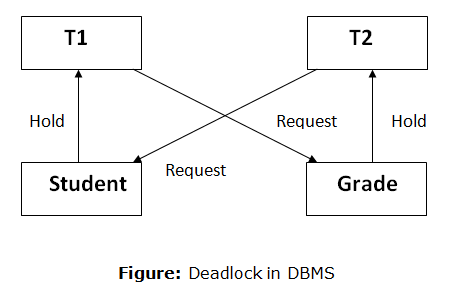
A deadlock is a condition where two or more transactions are waiting indefinitely for one another to give up locks. Deadlock is said to be one of the most feared complications in DBMS as no task ever gets finished and is in waiting state forever.
For example: In the student table, transaction T1 holds a lock on some rows and needs to update some rows in the grade table. Simultaneously, transaction T2 holds locks on some rows in the grade table and needs to update the rows in the Student table held by Transaction T1.
Now, the main problem arises. Now Transaction T1 is waiting for T2 to release its lock and similarly, transaction T2 is waiting for T1 to release its lock. All activities come to a halt state and remain at a standstill. It will remain in a standstill until the DBMS detects the deadlock and aborts one of the transactions.
Deadlock Avoidance
-
When a database is stuck in a deadlock state, then it is better to avoid the database rather than aborting or restating the database. This is a waste of time and resource.
-
Deadlock avoidance mechanism is used to detect any deadlock situation in advance. A method like "wait for graph" is used for detecting the deadlock situation but this method is suitable only for the smaller database. For the larger database, deadlock prevention method can be used.
Deadlock Detection
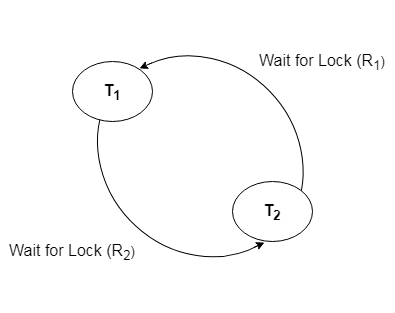
In a database, when a transaction waits indefinitely to obtain a lock, then the DBMS should detect whether the transaction is involved in a deadlock or not. The lock manager maintains a Wait for the graph to detect the deadlock cycle in the database.
Wait for Graph
-
This is the suitable method for deadlock detection. In this method, a graph is created based on the transaction and their lock. If the created graph has a cycle or closed loop, then there is a deadlock.
-
The wait for the graph is maintained by the system for every transaction which is waiting for some data held by the others. The system keeps checking the graph if there is any cycle in the graph.
The wait for a graph for the above scenario is shown below:
Deadlock Prevention
-
Deadlock prevention method is suitable for a large database. If the resources are allocated in such a way that deadlock never occurs, then the deadlock can be prevented.
-
The Database management system analyzes the operations of the transaction whether they can create a deadlock situation or not. If they do, then the DBMS never allowed that transaction to be executed.
Wait-Die scheme
In this scheme, if a transaction requests for a resource which is already held with a conflicting lock by another transaction then the DBMS simply checks the timestamp of both transactions. It allows the older transaction to wait until the resource is available for execution.
Let's assume there are two transactions Ti and Tj and let TS(T) is a timestamp of any transaction T. If T2 holds a lock by some other transaction and T1 is requesting for resources held by T2 then the following actions are performed by DBMS:
-
Check if TS(Ti) < TS(Tj) - If Ti is the older transaction and Tj has held some resource, then Ti is allowed to wait until the data-item is available for execution. That means if the older transaction is waiting for a resource which is locked by the younger transaction, then the older transaction is allowed to wait for resource until it is available.
-
Check if TS(T~i~) < TS(Tj) - If Ti is older transaction and has held some resource and if Tj is waiting for it, then Tj is killed and restarted later with the random delay but with the same timestamp.
Wound wait scheme
-
In wound wait scheme, if the older transaction requests for a resource which is held by the younger transaction, then older transaction forces younger one to kill the transaction and release the resource. After the minute delay, the younger transaction is restarted but with the same timestamp.
-
If the older transaction has held a resource which is requested by the Younger transaction, then the younger transaction is asked to wait until older releases it.
Two-Phase Locking Protocol
-
The two-phase locking protocol divides the execution phase of the transaction into three parts.
-
In the first part, when the execution of the transaction starts, it seeks permission for the lock it requires.
-
In the second part, the transaction acquires all the locks. The third phase is started as soon as the transaction releases its first lock.
-
In the third phase, the transaction cannot demand any new locks. It only releases the acquired locks.
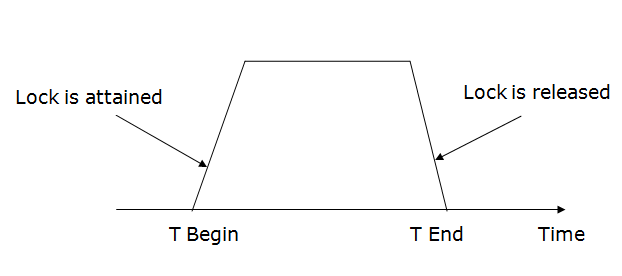
There are two phases of 2PL:
Growing phase: In the growing phase, a new lock on the data item may be acquired by the transaction, but none can be released.
Shrinking phase: In the shrinking phase, existing lock held by the transaction may be released, but no new locks can be acquired.
In the below example, if lock conversion is allowed then the following phase can happen:
-
Upgrading of lock (from S(a) to X (a)) is allowed in growing phase.
-
Downgrading of lock (from X(a) to S(a)) must be done in shrinking phase.
Example:
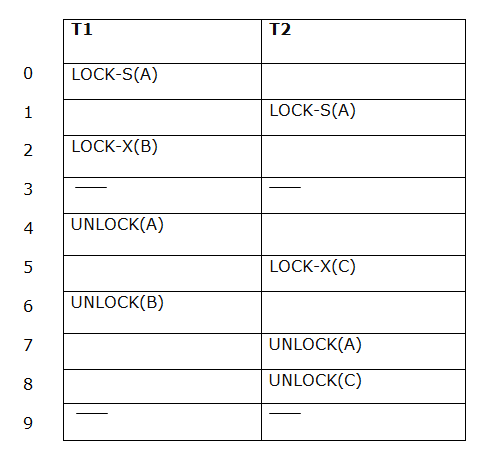
The following way shows how unlocking and locking work with 2-PL.
Transaction T1:
-
Growing phase: from step 1-3
-
Shrinking phase: from step 5-7
-
Lock point: at 3
Transaction T2:
-
Growing phase: from step 2-6
-
Shrinking phase: from step 8-9
-
Lock point: at 6
Strict Two-phase locking (Strict-2PL)
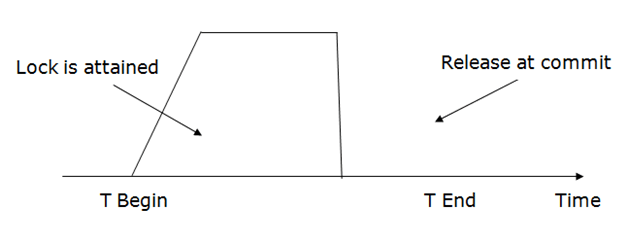
-
The first phase of Strict-2PL is similar to 2PL. In the first phase, after acquiring all the locks, the transaction continues to execute normally.
-
The only difference between 2PL and strict 2PL is that Strict-2PL does not release a lock after using it.
-
Strict-2PL waits until the whole transaction to commit, and then it releases all the locks at a time.
-
Strict-2PL protocol does not have shrinking phase of lock release.
Cursors
In database systems, cursors are temporary work areas created in system memory when executing Data Manipulation Language (DML) statements. Cursors can contain multiple rows of data, but typically, only one row is processed at a time. Cursors are useful in various databases, including Oracle, SQL Server, MySQL, etc. They are often used with DML statements like UPDATE, INSERT, and DELETE. Cursors can be categorized into two types:
- Implicit cursors
- Explicit cursors
Explicit Cursors
Explicit cursors are defined by programmers to have more control over the result set. They must be declared in the declaration section of a PL/SQL block and are typically used with SELECT statements that return multiple rows. The steps involved in creating an explicit cursor are as follows:
- Cursor Declaration: Initialize the memory for the cursor.
- Cursor Opening: Allocate memory for the cursor.
- Cursor Fetching: Retrieve data from the cursor.
- Cursor Closing: Release the allocated memory.
    CURSOR <cursorName> IS

        SELECT <Required fields> FROM <tableName>;
OPEN <cursorName>;
FETCH <cursorName> INTO <Respective columns>;
CLOSE <cursorName>;
Example
Consider a table "employees" with columns EMPLOYEEID, EMPLOYEENAME, and EMPLOYEECITY. Here's an example of using an explicit cursor to retrieve and display employee details:
DECLARE

   empId employees.EMPLOYEEID%type;

   empName employees.EMPLOYEENAME%type;

   empCity employees.EMPLOYEECITY%type;

   CURSOR c_employees is

      SELECT EMPLOYEEID, EMPLOYEENAME, EMPLOYEECITY FROM employees;

BEGIN

   OPEN c_employees;

   LOOP

      FETCH c_employees INTO empId , empName , empCity;

      EXIT WHEN c_employees %notfound;

      dbms_output.put_line(empId || ' ' || empName || ' ' || empCity);

   END LOOP;

   CLOSE c_employees;

END;
Implicit Cursors
Implicit cursors are used for DML statements, such as INSERT, UPDATE, and DELETE, as well as queries that return a single row. You don't need to declare an implicit cursor; it's automatically created. Implicit cursors are associated with cursor attributes that provide information about the execution of the most recently executed SQL statement. Common cursor attributes include:
%FOUND: Indicates whether a DML statement affected rows.%ISOPEN: Always returns False for implicit cursors.%NOTFOUND: Logical opposite of%FOUND.%ROWCOUNT: Returns the number of rows affected by an INSERT, UPDATE, or DELETE statement.
Example
Consider a table "tempory_employee" and operations using implicit cursor attributes:
CREATE TABLE tempory_employee AS SELECT * FROM employees;

DECLARE

  employeeNo NUMBER(4) := 2;

BEGIN

  DELETE FROM tempory_employee WHERE employeeId = employeeNo ;

  IF SQL%FOUND THEN

    INSERT INTO tempory_employee (employeeId,employeeName,employeeCity) VALUES (2, 'ZZZ', 'Delhi');

  END IF;

END;
The cursor attributes can be used to track the results of DML statements and control the flow of your PL/SQL code.
Stored Procedures
In SQL, a stored procedure is a set of statement(s) that perform some defined actions. We make stored procedures so that we can reuse statements that are used frequently.
Stored procedures are thus similar to functions in programming. They can perform specified operations when we call them.
Creating a Procedure
We create stored procedures using the CREATE PROCEDURE command followed by SQL commands. For example,
SQL Server
CREATE PROCEDURE us_customers AS

SELECT customer_id, first_name

FROM Customers

WHERE Country = 'USA';
PostgreSQL
CREATE PROCEDURE us_customers ()

LANGUAGE SQL

AS $$

SELECT customer_id, first_name

FROM Customers

WHERE Country = 'USA';

$$;
MySQL
DELIMITER //

CREATE PROCEDURE us_customers ()

BEGIN

SELECT customer_id, first_name

FROM Customers

WHERE Country = 'USA';

END //

DELIMITER ;
Oracle
CREATE PROCEDURE us_customers

AS res SYS_REFCURSOR;

BEGIN

open res for

SELECT customer_id, first_name

FROM Customers

WHERE country = 'USA';

DBMS_SQL.RETURN_RESULT(res);

END;
The commands above create a stored procedure named us_customers in various DBMS. This procedure selects the customer_id and first_name columns of those customers who live in the USA from the Customers table.
Executing Stored Procedure
Now, whenever we want to fetch all customers who live in the USA, we can simply call the procedure mentioned above. For example,
SQL Server, Oracle
EXEC us_customers;
PostgreSQL, MySQL
CALL us_customers();
Drop Procedure
We can delete stored procedures by using the DROP PROCEDURE command. For example,
SQL Server, PostgreSQL, MySQL
DROP PROCEDURE us_customers;
Here, the SQL
Stored Function
===============
A stored function in MySQL is a set of SQL statements that perform some task/operation and return a single value. It is one of the types of stored programs in MySQL. When you will create a stored function, make sure that you have a CREATE ROUTINE database privilege. Generally, we used this function to encapsulate the common business rules or formulas reusable in stored programs or SQL statements.
The stored function is almost similar to the procedure in MySQL, but it has some differences that are as follows:
-
The function parameter may contain only the IN parameter but can't allow specifying this parameter, while the procedure can allow IN, OUT, INOUT parameters.
-
The stored function can return only a single value defined in the function header.
-
The stored function may also be called within SQL statements.
-
It may not produce a result set.
Thus, we will consider the stored function when our program's purpose is to compute and return a single value only or create a user-defined function.
The syntax of creating a stored function in MySQL is as follows:
1. DELIMITER $$
2. CREATE FUNCTION fun_name(fun_parameter(s))
3. RETURNS datatype
4. [NOT] {Characteristics}
5. fun_body;
Parameter Used
The stored function syntax uses the following parameters which are discussed below:
| Parameter Name | Descriptions |
| fun_name | It is the name of the stored function that we want to create in a database. It should not be the same as the built-in function name of MySQL. |
| fun_parameter | It contains the list of parameters used by the function body. It does not allow to specify IN, OUT, INOUT parameters. |
| datatype | It is a data type of return value of the function. It should any valid MySQL data type. |
| characteristics | The CREATE FUNCTION statement only accepted when the characteristics (DETERMINISTIC, NO SQL, or READS SQL DATA) are defined in the declaration. |
| fun_body | This parameter has a set of SQL statements to perform the operations. It requires at least one RETURN statement. When the return statement is executed, the function will be terminated automatically. The function body is given below: BEGIN -- SQL statements END $$ DELIMITER |
MySQL Stored Function Example
Let us understand how stored function works in MySQL through the example. Suppose our database has a table named "customer" that contains the following data:
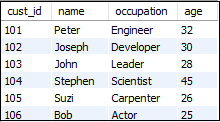
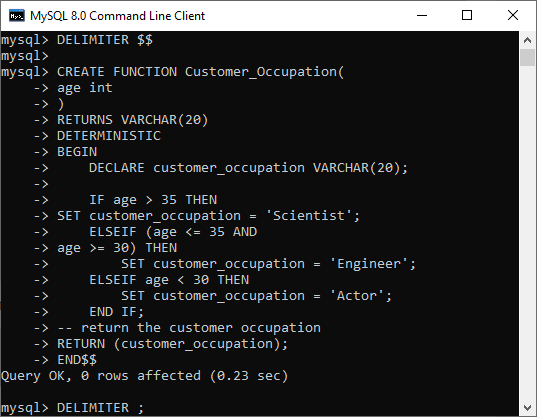
Now, we will create a function that returns the customer occupation based on the age using the below statement.
1. DELIMITER $$
2. CREATE FUNCTION Customer_Occupation(
3. age int
4. )
5. RETURNS VARCHAR(20)
6. DETERMINISTIC
7. BEGIN
8. DECLARE customer_occupation VARCHAR(20);
9. IF age > 35 THEN
10. SET customer_occupation = 'Scientist';
11. ELSEIF (age <= 35 AND
12. age >= 30) THEN
13. SET customer_occupation = 'Engineer';
14. ELSEIF age < 30 THEN
15. SET customer_occupation = 'Actor';
16. END IF;
17. -- return the customer occupation
18. RETURN (customer_occupation);
19. END$$
20. DELIMITER;
Execute the above statement on the command-line tool, as shown below:
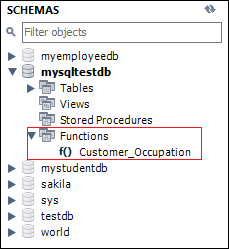
Once the function creation is successful, we can see it in the MySQL workbench under the Function section like below image:
We can also see all stored functions available in the current database using the following statement:
1. SHOW FUNCTION STATUS WHERE db = 'mysqltestdb';
After executing the above command, we will get the output as below:

Stored Function Call
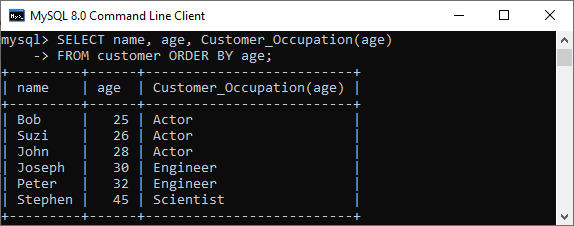
Now, we are going to see how stored function is called with the SQL statement. The following statement uses customer_occupation stored function to get the result:
1. SELECT name, age, Customer_Occupation(age)
2. FROM customer ORDER BY age;
It will give the output as below.
We can also call the above function within another stored program, such as procedure, function, or trigger or any other MySQL built-in function.
Stored Function Call in Procedure
Here, we are going to see how this function can be called in a stored procedure. This statement creates a procedure in a database that uses Customer_Occupation() stored function.
1. DELIMITER $$
2. CREATE PROCEDURE GetCustomerDetail()
3. BEGIN
4. SELECT name, age, Customer_Occupation(age) FROM customer ORDER BY age;
5. END$$
6. DELIMITER ;
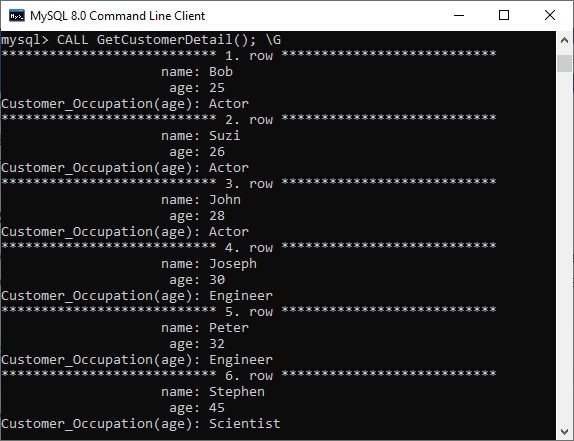
The below statement can be used to call the stored procedure:
1. CALL GetCustomerDetail();
We will get the output as below:
Trigger
Trigger
A trigger is a statement that a database system executes automatically when there is any modification to the database. In a trigger, you specify when the trigger is to be executed and the action to be performed when the trigger executes. Triggers are used to specify certain integrity constraints and referential constraints that cannot be specified using the constraint mechanism of SQL.
Example
Suppose we are adding a tuple to the 'Donors' table, indicating that someone has donated blood. We can design a trigger that will automatically add the donated blood value to the 'Blood_record' table.
Types of Triggers
Triggers can be defined in six types for each table:
1. AFTER INSERT: Activated after data is inserted into the table.
2. AFTER UPDATE: Activated after data in the table is modified.
3. AFTER DELETE: Activated after data is deleted/removed from the table.
4. BEFORE INSERT: Activated before data is inserted into the table.
5. BEFORE UPDATE: Activated before data in the table is modified.
6. BEFORE DELETE: Activated before data is deleted/removed from the table.
Examples showing implementation of Triggers
1. Write a trigger to ensure that no employee under the age of 25 can be inserted into the database.
DELIMITER $$

CREATE TRIGGER Check_age BEFORE INSERT ON employee

FOR EACH ROW

BEGIN

    IF NEW.age < 25 THEN

        SIGNAL SQLSTATE '45000'

        SET MESSAGE_TEXT = 'ERROR: AGE MUST BE AT LEAST 25 YEARS!';

    END IF;

END;

$$

DELIMITER;
Explanation: This trigger named 'Check_age' checks the age attribute before inserting any tuple into the 'employee' table. If the age is less than 25, it raises an error message.
2. Create a trigger that works before deletion in the 'employee' table and creates a duplicate copy of the record in another table 'employee_backup'.
Before writing the trigger, we need to create the 'employee_backup' table.
CREATE TABLE employee_backup (

    employee_no INT,

    employee_name VARCHAR(40),

    job VARCHAR(40),

    hiredate DATE,

    salary INT,

    PRIMARY KEY (employee_no)

);`

Now, let's create the trigger:


```sql
DELIMITER $$

CREATE TRIGGER Backup BEFORE DELETE ON employee

FOR EACH ROW

BEGIN

    INSERT INTO employee_backup

    VALUES (OLD.employee_no, OLD.name, OLD.job, OLD.hiredate, OLD.salary);

END;

$$

DELIMITER;
Explanation: This trigger named 'Backup' creates a backup copy of employee records in the 'employee_backup' table before any deletion operation in the 'employee' table.
3. Write a trigger to count the number of new tuples inserted using each insert statement.
sql
DECLARE count INT;

SET count = 0;

DELIMITER $$

CREATE TRIGGER Count_tuples AFTER INSERT ON employee

FOR EACH ROW

BEGIN

    SET count = count + 1;

END;

$$

DELIMITER;
Explanation: This trigger named 'Count_tuples' keeps track of the number of new tuples inserted into the 'employee' table by incrementing the 'count' variable after each insertion.
Please note that you should adapt the table and column names to your specific database schema when implementing these triggers
References
-
https://www.javatpoint.com/transactions-in-dbms
-
https://www.geeksforgeeks.org/transaction-management/
-
https://www.educba.com/transaction-control-language/
-
https://www.section.io/engineering-education/transaction-management-in-database/
-
https://www.geeksforgeeks.org/acid-properties-in-dbms/
-
https://www.javatpoint.com/serializability-in-dbms
-
https://www.techtarget.com/searchapparchitecture/definition/two-phase-commit-2PC
-
https://www.javatpoint.com/deadlock-in-dbms
-
https://www.geeksforgeeks.org/cursors-in-dbms-definition-types-attributes-uses/
-
https://www.javatpoint.com/mysql-stored-function
-
https://www.programiz.com/sql/stored-procedures