Unit 2: Requirement Analysis & Specification
- Unit 2: Requirement Analysis \& Specification
- Software Requirements (Functional and Non-Functional)
- User Requirements
- System Requirements
- Software Requirements Document
- Requirement Engineering Process
- Feasibility Studies
- Requirements Elicitation and Analysis
- Requirements Validation
- Requirements Management
- Classical Analysis (Structured System Analysis, Petri Nets, Data Dictionary)
- References
Software Requirements (Functional and Non-Functional)
Software Requirements: Software requirements are the descriptions of what a software system should do and how it should behave. They serve as the foundation for the design, implementation, and testing of the software. Requirements provide a clear and detailed understanding of the expected functionality, features, and constraints of the software.
Functional Requirements: Functional requirements describe what the software should do in terms of specific functions, features, and interactions with users or other systems. These requirements are action-oriented and focus on the software's behavior in response to different inputs and conditions. Examples of functional requirements include user authentication, data validation, report generation, and data processing.
Non-Functional Requirements: Non-functional requirements, also known as quality attributes or software qualities, specify how the software should perform rather than what it should do. These requirements address aspects such as performance, security, scalability, usability, reliability, and maintainability. Non-functional requirements are critical for ensuring that the software meets user expectations and industry standards.
Difference Between Functional & Non-Functional Requirements:
| Functional Requirements | Non-Functional Requirements |
|---|---|
| A functional requirement defines a system or its component. | A non-functional requirement defines the quality attribute of a software system. |
| It specifies “What should the software system do?” | It places constraints on “How should the software system fulfill the functional requirements?” |
| Functional requirement is specified by User. | Non-functional requirement is specified by technical people (e.g., Architect, Technical leaders, and software developers). |
| It is mandatory. | It is not mandatory. |
| It is captured in use case. | It is captured as a quality attribute. |
| Defined at a component level. | Applied to a system as a whole. |
| Helps you verify the functionality of the software. | Helps you to verify the performance of the software. |
| Functional Testing like System, Integration, End to End, API testing, etc are done. | Non-Functional Testing like Performance, Stress, Usability, Security testing, etc are done. |
| Usually easy to define. | Usually more difficult to define. |
| Example | Example |
| 1) Authentication of the user whenever he/she logs into the system. | 1) Emails should be sent with a latency of no greater than 12 hours from such an activity. |
| 2) System shutdown in case of a cyber attack. | 2) The processing of each request should be done within 10 seconds. |
| 3) A verification email is sent to the user whenever he/she registers for the first time on some software system. | 3) The site should load in 3 seconds when the number of simultaneous users is > 10000. |
Significance of Software Requirements:
-
Blueprint for Development: Software requirements provide a blueprint for software developers, helping them understand what needs to be built and how it should work.
-
Alignment with User Needs: Requirements ensure that the software aligns with the needs and expectations of end-users and stakeholders.
-
Basis for Testing: Testing is guided by requirements. Test cases are designed to validate that the software meets the specified functional and non-functional criteria.
-
Scope Control: Requirements help define the scope of the project, ensuring that the project team and stakeholders have a shared understanding of the software's boundaries.
-
Minimizing Ambiguity: Well-defined requirements reduce ambiguity and misunderstandings, which can lead to costly rework and delays.
-
Documentation: They serve as a key component of the Software Requirements Document (SRD) or Software Requirements Specification (SRS).
Challenges in Requirements:
-
Changing Requirements: Requirements can change over time due to evolving user needs, market conditions, or technological advancements. Managing changing requirements can be challenging.
-
Incomplete or Ambiguous Requirements: Ambiguities or gaps in requirements can lead to misunderstandings and misinterpretations.
-
Balancing Functional and Non-Functional Requirements: Achieving a balance between functional and non-functional requirements, and ensuring that both are met, can be complex.
-
Scope Creep: Uncontrolled expansion of requirements, known as scope creep, can lead to project delays and budget overruns.
-
Conflicting Requirements: Different stakeholders may have conflicting requirements, necessitating negotiation and trade-offs.
Best Practices for Managing Software Requirements:
-
Requirements Elicitation: Engage stakeholders early in the requirements elicitation process to capture their needs accurately.
-
Documentation: Maintain a comprehensive and up-to-date Software Requirements Document (SRD) or Software Requirements Specification (SRS).
-
Validation and Verification: Use techniques like validation and verification to ensure that requirements are complete, consistent, and correct.
-
Change Management: Implement a robust change management process to handle evolving requirements.
-
Prioritization: Prioritize requirements based on their criticality and potential impact on project success.
-
Communication: Foster open and transparent communication among project stakeholders to resolve conflicts and ensure shared understanding.
User Requirements
User Requirements: User requirements, also known as business requirements or stakeholder requirements, are a subset of software requirements that focus on the needs, expectations, and constraints of the software's end-users or stakeholders. These requirements provide a user-centric perspective on what the software should achieve and how it should interact with users.
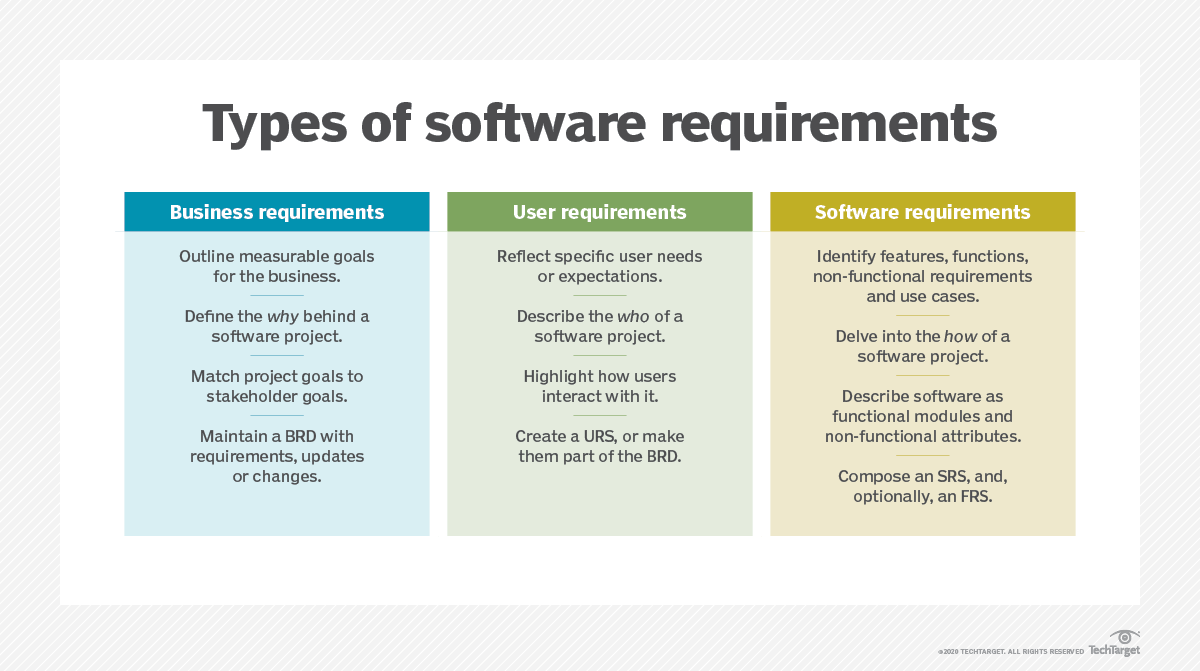
Key Characteristics of User Requirements:
-
User-Centered: User requirements are centered around the experiences and expectations of the software's end-users or stakeholders.
-
Functional and Non-Functional: User requirements encompass both functional aspects (what the software should do) and non-functional aspects (how well it should perform).
-
High-Level: User requirements are often expressed in a high-level, non-technical language that is understandable to stakeholders who may not have technical expertise.
-
Observable Outcomes: They describe observable outcomes or results that users expect from the software.
Methods for Eliciting User Requirements:
-
Interviews: Conducting one-on-one or group interviews with end-users and stakeholders to understand their needs and preferences.
-
Surveys and Questionnaires: Collecting feedback and requirements through structured surveys and questionnaires distributed to a larger user group.
-
Observations: Observing users in their work environment to gain insights into their workflows and pain points.
-
Use Cases and Scenarios: Creating use cases and user scenarios to outline specific interactions and behaviors of the software from the user's perspective.
-
Prototyping: Building prototypes or mockups of the software to gather user feedback and refine requirements.
Benefits of User Requirements:
-
User Satisfaction: User requirements ensure that the software aligns with the needs and expectations of the end-users, leading to higher user satisfaction.
-
Reduced Rework: Capturing user requirements accurately reduces the likelihood of rework and changes after the software development has begun.
-
Improved Usability: Prioritizing user needs results in a more user-friendly and intuitive software interface.
-
Scope Clarity: User requirements help define the scope of the project by specifying what the software should and should not do.
-
User Involvement: Involving users in the requirements elicitation process promotes collaboration and buy-in from key stakeholders.
Challenges in Managing User Requirements:
-
Changing User Needs: User needs can evolve over time, requiring a flexible approach to accommodate changes.
-
Communication Gap: Misunderstandings between technical and non-technical stakeholders can lead to discrepancies in user requirements.
-
Incomplete Requirements: Users may not be able to articulate all their needs, leading to potential gaps in the requirements.
-
Conflicting Requirements: Different user groups or stakeholders may have conflicting requirements, necessitating negotiation and prioritization.
Best Practices for Managing User Requirements:
-
User Involvement: Involve users and stakeholders from the beginning of the project to ensure their needs are well understood and considered.
-
Documentation: Thoroughly document user requirements in a clear and accessible format, such as a Software Requirements Document (SRD) or User Requirements Specification.
-
Validation: Validate user requirements through feedback, reviews, and testing to ensure they accurately represent user needs.
-
Change Management: Implement a change management process to handle evolving user requirements.
-
Alignment with Organizational Goals: Ensure that user requirements align with the organization's overall goals and strategic objectives.
System Requirements
System Requirements: System requirements are a subset of software requirements that detail the technical specifications and constraints for the software system. Unlike user requirements, which focus on user needs and expectations, system requirements address how the software should be designed, developed, and deployed from a technical perspective.
Key Characteristics of System Requirements:
-
Technical Specifications: System requirements specify the technical aspects of the software, including hardware, software, network, and security requirements.
-
Performance Parameters: They define performance metrics such as response times, throughput, and capacity.
-
Compatibility: System requirements address compatibility with operating systems, databases, browsers, and other software components.
-
Security and Compliance: Security requirements, data protection, and compliance with regulations and standards are essential aspects of system requirements.
-
Deployment and Integration: System requirements cover deployment scenarios, integration with other systems, and data migration.
Methods for Eliciting System Requirements:
-
Technical Interviews: Conduct interviews with technical experts, architects, and engineers to gather insights into the system's technical needs.
-
Prototyping: Create technical prototypes or proof-of-concept implementations to validate technical requirements.
-
Consultation with Vendors: If the project involves third-party software or hardware, consult with vendors to understand their technical requirements and compatibility.
-
Review of Standards and Regulations: Ensure that the system complies with industry standards and legal regulations by reviewing relevant documents.
Benefits of System Requirements:
-
Technical Clarity: System requirements provide clear technical guidelines for software development and architecture.
-
Performance Assurance: They ensure that the software meets performance, scalability, and security criteria.
-
Interoperability: System requirements address compatibility and integration with other systems, reducing integration challenges.
-
Security and Compliance: They help in incorporating security measures and ensuring compliance with industry standards and regulations.
-
Risk Mitigation: System requirements help identify potential technical risks and enable risk mitigation planning.
Challenges in Managing System Requirements:
-
Complexity: Defining and managing complex system requirements can be challenging, especially for large and intricate projects.
-
Evolving Technology: Rapid technological advancements may require updates to system requirements during the project's lifecycle.
-
Dependencies: System requirements often have dependencies on external factors, such as hardware availability or third-party software updates.
-
Balancing Technical and User Requirements: Balancing technical requirements with user requirements and ensuring both are met can be complex.
Best Practices for Managing System Requirements:
-
Technical Expertise: Involve technical experts and architects in the requirements elicitation process to ensure accuracy and completeness.
-
Documentation: Document system requirements in a clear and accessible format, such as a Software Requirements Document (SRD) or System Requirements Specification.
-
Validation: Validate system requirements through technical reviews, testing, and validation against architectural designs.
-
Change Management: Implement a change management process to handle evolving system requirements, especially in response to changing technology.
-
Risk Assessment: Conduct risk assessments to identify and address potential technical risks associated with system requirements.
Software Requirements Document
Software Requirements Document (SRD): A Software Requirements Document, also known as a Software Requirements Specification (SRS), is a comprehensive document that outlines all the software requirements, both functional and non-functional, for a software project. It serves as a crucial reference for all stakeholders, including developers, testers, and project managers.
Key Components of a Software Requirements Document:
-
Introduction: The introduction provides an overview of the document, including its purpose, scope, and a brief description of the software project.
-
User Requirements: This section presents the user-centric requirements, capturing the needs, expectations, and constraints of the software's end-users and stakeholders.
-
System Requirements: System requirements detail the technical specifications, performance parameters, and constraints for the software system.
-
Functional Requirements: Functional requirements describe what the software should do, specifying features, interactions, and functionalities.
-
Non-Functional Requirements: Non-functional requirements address the quality attributes of the software, including performance, security, usability, and scalability.
-
Use Cases and Scenarios: Use cases and user scenarios provide specific examples of how the software will be used and the expected behavior in different situations.
-
Data Requirements: Data requirements define data structures, storage, access, and data processing needs for the software.
-
Interface Requirements: Interface requirements describe how the software will interact with external systems, APIs, or hardware components.
-
Security and Compliance Requirements: This section outlines security measures, data protection, and compliance with industry standards and regulations.
-
Dependencies and Assumptions: Any dependencies on external factors, such as hardware, third-party software, or data sources, are documented, along with project assumptions.
-
Constraints: Constraints refer to limitations or restrictions that may affect the software development or usage.
-
Change Control: The document includes a section outlining the change management process for handling modifications to requirements during the project.
Benefits of a Software Requirements Document:
-
Clarity and Alignment: An SRD ensures that all stakeholders have a clear and aligned understanding of the software project's requirements.
-
Reference Point: The SRD serves as a reference throughout the project's lifecycle, from design and development to testing and quality assurance.
-
Scope Management: It helps in defining and managing the project's scope, preventing scope creep.
-
Risk Mitigation: An SRD identifies potential risks and uncertainties associated with the project's requirements.
-
Quality Assurance: The document guides quality assurance efforts, ensuring that the software meets the specified criteria.
-
Communication: It promotes effective communication among project teams, stakeholders, and developers.
Challenges in Creating a Software Requirements Document:
-
Requirement Volatility: Changing requirements and evolving user needs can lead to frequent updates and revisions of the SRD.
-
Complexity: Managing and documenting complex and large sets of requirements can be challenging.
-
Dependencies: Dealing with dependencies on external factors, third-party software, or hardware components requires careful consideration.
-
Balancing User and System Requirements: Ensuring a balance between user requirements and system requirements is critical.
Best Practices for Creating a Software Requirements Document:
-
Stakeholder Involvement: Involve key stakeholders in the creation and review of the SRD to ensure alignment with their needs.
-
Clarity and Specificity: Ensure that requirements are clear, specific, and unambiguous, using appropriate terminology.
-
Change Management: Implement a robust change management process to handle evolving requirements and revisions to the SRD.
-
Version Control: Maintain version control for the SRD to track changes and updates.
-
Validation: Validate the SRD through reviews, testing, and validation against architectural designs.
-
Documentation Style and Format: Use a consistent style and format for the document to enhance readability and accessibility.
Requirement Engineering Process
Requirement Engineering: Requirement engineering, also known as requirements engineering, is the systematic and disciplined process of defining, documenting, and managing software requirements. It encompasses all the activities involved in understanding user needs, translating them into technical specifications, and ensuring that the final software product meets these requirements.
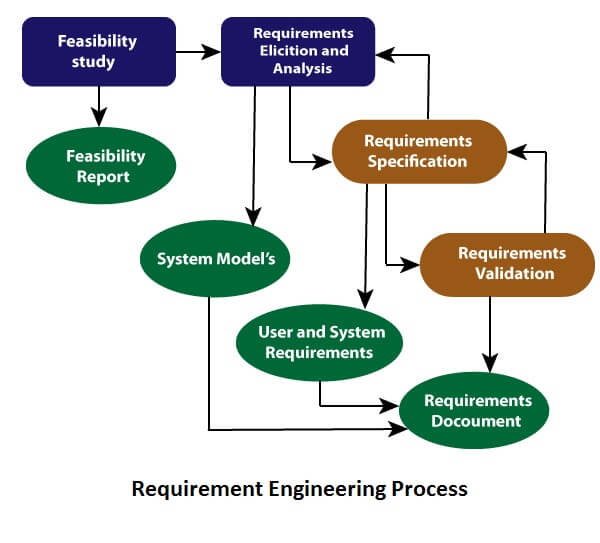
Key Stages of Requirement Engineering:
-
Elicitation: Elicitation involves gathering and extracting requirements from various sources, including stakeholders, end-users, and existing documentation. Techniques such as interviews, surveys, and observations are used to collect requirements.
-
Analysis: The analysis stage involves examining the collected requirements for completeness, consistency, and relevance. Conflicting or ambiguous requirements are resolved, and dependencies are identified.
-
Specification: During specification, requirements are documented in a clear and structured manner. This includes creating a Software Requirements Document (SRD) or Software Requirements Specification (SRS).
-
Validation: Validation ensures that the specified requirements accurately represent user needs and that they align with the project's goals. Reviews, walkthroughs, and testing may be used for validation.
-
Management: Requirement management encompasses the handling of changes to requirements, maintaining a requirements baseline, and ensuring that requirements are tracked throughout the project's lifecycle.
Benefits of Requirement Engineering:
-
Clear Understanding: Requirement engineering helps in developing a clear and shared understanding of what the software should achieve.
-
Scope Control: It assists in defining and managing the project's scope, preventing scope creep and changes that can lead to delays and budget overruns.
-
Quality Assurance: The process ensures that requirements are complete, consistent, and aligned with user needs, improving the chances of delivering a high-quality software product.
-
Risk Mitigation: By identifying potential issues and conflicts early in the process, requirement engineering supports effective risk mitigation planning.
-
Communication: It promotes effective communication among project teams and stakeholders, reducing misunderstandings and ambiguities.
Challenges in Requirement Engineering:
-
Changing Requirements: Requirements can change over time due to evolving user needs or market conditions. Managing changing requirements is a significant challenge.
-
Incomplete or Ambiguous Requirements: Ambiguities or gaps in requirements can lead to misunderstandings and misinterpretations.
-
Conflicting Requirements: Different stakeholders may have conflicting requirements, necessitating negotiation and trade-offs.
-
Balancing User and System Requirements: Ensuring a balance between user requirements and technical system requirements is complex.
Best Practices in Requirement Engineering:
-
Stakeholder Engagement: Engage stakeholders, including end-users and project sponsors, early in the process to ensure their needs are accurately captured.
-
Documentation: Maintain a comprehensive and up-to-date Software Requirements Document (SRD) or Software Requirements Specification.
-
Validation and Verification: Use techniques like validation and verification to ensure that requirements are complete, consistent, and correct.
-
Change Management: Implement a robust change management process to handle evolving requirements.
-
Communication: Foster open and transparent communication among project team members, stakeholders, and sponsors.
Feasibility Studies
Feasibility Studies: Feasibility studies are an essential step in the software development process that assess the viability and practicality of a proposed software project. They aim to determine whether the project is worth pursuing by evaluating technical, economic, operational, legal, and scheduling factors.
Types of Feasibility Studies:
-
Technical Feasibility: Technical feasibility assesses whether the proposed software project can be developed using the available technology and within the constraints of the organization. It considers factors such as the availability of necessary skills, hardware, software, and development tools.
-
Economic Feasibility: Economic feasibility evaluates whether the software project is financially viable. It involves estimating the costs of development, maintenance, and operation, as well as the potential benefits, such as increased revenue or cost savings. A cost-benefit analysis is typically performed to determine the project's return on investment (ROI).
-
Operational Feasibility: Operational feasibility assesses whether the software, once developed, can be integrated into the existing operational processes and whether it will be accepted by users. It considers factors such as user training, change management, and the impact on day-to-day operations.
-
Legal Feasibility: Legal feasibility examines whether the proposed software project complies with legal and regulatory requirements. It assesses issues related to intellectual property, data protection, and other legal considerations.
-
Scheduling Feasibility: Scheduling feasibility evaluates whether the project can be completed within the defined timeframe. It takes into account project dependencies, resource availability, and potential risks that could affect the project's timeline.
Benefits of Feasibility Studies:
-
Risk Mitigation: Feasibility studies help identify potential issues and risks early in the project, allowing for effective risk mitigation planning.
-
Informed Decision-Making: They provide critical information to project sponsors and stakeholders, enabling informed decisions about whether to proceed with the project.
-
Cost Control: Economic feasibility studies help in estimating project costs and potential returns, ensuring cost-effective project management.
-
Operational Preparedness: Operational feasibility studies assist in preparing for the impact of the software on existing operations and user acceptance.
-
Legal Compliance: Legal feasibility studies ensure that the software project complies with all relevant laws and regulations, reducing legal risks.
Challenges in Conducting Feasibility Studies:
-
Data Availability: Obtaining accurate and reliable data for economic feasibility analysis can be challenging.
-
Complexity: Conducting comprehensive feasibility studies, especially for large and complex projects, can be time-consuming and resource-intensive.
-
Changing Factors: Economic, technical, and legal factors may change over time, affecting the feasibility of a project.
-
Subjectivity: Some aspects of feasibility, such as estimating potential benefits or risks, involve subjectivity.
Best Practices in Conducting Feasibility Studies:
-
Interdisciplinary Teams: Form interdisciplinary teams with experts in technology, finance, operations, legal, and project management to conduct thorough feasibility studies.
-
Data Validation: Validate data sources and assumptions to improve the accuracy of economic and scheduling feasibility assessments.
-
Scenario Analysis: Consider multiple scenarios, including best-case, worst-case, and most likely, to evaluate the impact of different factors on feasibility.
-
Regular Updates: Periodically review and update feasibility studies to account for changing factors and evolving project conditions.
Requirements Elicitation and Analysis
Requirements Elicitation: Requirements elicitation is the process of gathering, identifying, and documenting software requirements from various sources, including stakeholders, end-users, and existing documentation. It is a crucial initial step in the software development process, as it sets the foundation for understanding what the software should achieve.
Key Activities in Requirements Elicitation:
-
Stakeholder Identification: Identify and involve all relevant stakeholders, including end-users, customers, project sponsors, and subject matter experts.
-
Data Collection: Collect data and information related to the project, such as existing documents, user feedback, and market research.
-
Interviews: Conduct one-on-one or group interviews with stakeholders to understand their needs, expectations, and constraints.
-
Surveys and Questionnaires: Use structured surveys and questionnaires to gather feedback from a broader user group.
-
Observations: Observe users in their work environment to gain insights into their workflows and pain points.
-
Use Cases and Scenarios: Create use cases and user scenarios to outline specific interactions and behaviors of the software from the user's perspective.
-
Prototyping: Build prototypes or mockups of the software to gather user feedback and refine requirements.
Requirements Analysis: Requirements analysis follows elicitation and involves examining the collected requirements to ensure they are complete, consistent, relevant, and unambiguous. This stage aims to identify potential conflicts, dependencies, and gaps in the requirements.
Key Activities in Requirements Analysis:
-
Requirements Classification: Categorize requirements as user requirements, system requirements, functional requirements, or non-functional requirements.
-
Requirements Prioritization: Prioritize requirements based on their importance and impact on the project's success.
-
Conflict Resolution: Address any conflicts or discrepancies in the requirements, either through negotiation or by involving stakeholders in decision-making.
-
Dependencies Identification: Identify dependencies between requirements and assess their impact on the project.
-
Gap Analysis: Perform gap analysis to identify any gaps or missing requirements that need to be addressed.
Benefits of Requirements Elicitation and Analysis:
-
User-Centric Design: Elicitation ensures that the software design is user-centric, aligning with user needs and expectations.
-
Scope Definition: Elicitation and analysis contribute to defining the project's scope, preventing scope creep.
-
Quality Assurance: Analysis ensures that requirements are complete, consistent, and relevant, improving the chances of delivering a high-quality software product.
-
Risk Mitigation: Early identification of conflicts, gaps, and dependencies supports effective risk mitigation planning.
-
Communication: The process promotes effective communication among project teams and stakeholders, reducing misunderstandings and ambiguities.
Challenges in Requirements Elicitation and Analysis:
-
Changing Requirements: User needs and project conditions may change over time, requiring updates to requirements.
-
Incomplete or Ambiguous Requirements: Ambiguities or gaps in requirements can lead to misunderstandings and misinterpretations.
-
Conflicting Requirements: Different stakeholders may have conflicting requirements, necessitating negotiation and trade-offs.
-
Balancing User and System Requirements: Ensuring a balance between user requirements and technical system requirements can be complex.
Best Practices in Requirements Elicitation and Analysis:
-
Stakeholder Engagement: Engage stakeholders, including end-users and project sponsors, early in the process to ensure their needs are accurately captured.
-
Documentation: Maintain a comprehensive and up-to-date Software Requirements Document (SRD) or Software Requirements Specification.
-
Validation and Verification: Use techniques like validation and verification to ensure that requirements are complete, consistent, and correct.
-
Change Management: Implement a robust change management process to handle evolving requirements.
-
Communication: Foster open and transparent communication among project team members, stakeholders, and sponsors.
Requirements Validation
Requirements Validation: Requirements validation is the process of ensuring that the specified software requirements accurately represent user needs and that they align with the project's goals. Validation verifies that the documented requirements are complete, consistent, relevant, and free from ambiguities and errors.
Key Activities in Requirements Validation:
-
Reviews and Inspections: Conduct reviews and inspections of the Software Requirements Document (SRD) or Software Requirements Specification (SRS) to identify inconsistencies, omissions, and errors in the requirements.
-
Walkthroughs: Organize walkthroughs where project stakeholders, including end-users, review and provide feedback on the requirements.
-
Prototyping: Use prototypes or mockups to demonstrate the requirements to end-users and stakeholders for feedback and validation.
-
Simulation: In some cases, simulation tools or techniques can be used to validate requirements, especially for complex and critical systems.
-
Traceability Analysis: Ensure that there is traceability between requirements and other project artifacts, such as design documents and test cases.
-
User Acceptance Testing (UAT): Conduct user acceptance testing to allow end-users to interact with the software and validate that it meets their needs and expectations.
Benefits of Requirements Validation:
-
Quality Assurance: Validation ensures that requirements are complete, consistent, and relevant, improving the chances of delivering a high-quality software product.
-
User Satisfaction: Validation through user involvement and acceptance testing increases user satisfaction with the final software.
-
Risk Mitigation: Identifying and resolving issues in the requirements early in the project supports effective risk mitigation planning.
-
Clear Communication: Validation promotes clear and effective communication among project teams and stakeholders, reducing misunderstandings and ambiguities.
Challenges in Requirements Validation:
-
Changing Requirements: User needs and project conditions may change over time, requiring updates to requirements even after validation.
-
Incomplete or Ambiguous Requirements: Ambiguities or gaps in requirements can lead to misunderstandings and misinterpretations.
-
Conflicting Requirements: Different stakeholders may have conflicting requirements, necessitating negotiation and trade-offs.
-
Balancing User and System Requirements: Ensuring a balance between user requirements and technical system requirements can be complex.
Best Practices in Requirements Validation:
-
User Involvement: Involve end-users and project stakeholders in the validation process to ensure that the software meets their needs and expectations.
-
Traceability: Ensure traceability between requirements and other project artifacts, facilitating validation and change management.
-
Documentation: Maintain clear and accessible documentation of requirements, review findings, and validation results.
-
Continuous Improvement: Use validation results as feedback to improve the requirements elicitation and analysis processes.
-
Communication: Foster open and transparent communication among project team members, stakeholders, and sponsors to address validation issues effectively.
Requirements Management
Requirements Management: Requirements management is the process of handling and controlling software requirements throughout a project's lifecycle. It includes the capture, documentation, tracking, and control of requirements to ensure that they remain relevant and well-aligned with the project's goals.
Key Activities in Requirements Management:
-
Requirements Capture: Capture requirements from various sources, including stakeholders, end-users, and existing documentation.
-
Documentation: Maintain a comprehensive and up-to-date Software Requirements Document (SRD) or Software Requirements Specification (SRS).
-
Change Control: Implement a robust change management process to handle modifications to requirements during the project. This process may involve assessing the impact of changes and obtaining approval from stakeholders.
-
Version Control: Maintain version control for the SRD to track changes and updates, ensuring that the most recent requirements are available.
-
Traceability: Ensure that there is traceability between requirements and other project artifacts, such as design documents and test cases.
-
Baseline Management: Establish and manage requirements baselines to capture a snapshot of requirements at specific points in time.
-
Validation and Verification: Use techniques like validation and verification to ensure that requirements are complete, consistent, and correct.
Benefits of Requirements Management:
-
Scope Control: Requirements management assists in defining and managing the project's scope, preventing scope creep.
-
Risk Mitigation: Early identification and management of changes and updates to requirements support effective risk mitigation planning.
-
Quality Assurance: Managing requirements ensures that they remain complete, consistent, and relevant, contributing to the quality of the final software product.
-
Communication: The process promotes clear and effective communication among project teams and stakeholders, reducing misunderstandings and ambiguities.
Challenges in Requirements Management:
-
Changing Requirements: User needs and project conditions may change over time, requiring updates to requirements and effective change management.
-
Complexity: Managing and documenting complex and large sets of requirements can be challenging.
-
Dependencies: Dealing with dependencies between requirements and other project artifacts, such as design and test cases, requires careful coordination.
-
Balancing User and System Requirements: Ensuring a balance between user requirements and technical system requirements is complex.
Best Practices in Requirements Management:
-
Change Management: Implement a robust change management process to handle evolving requirements, assess the impact of changes, and obtain stakeholder approval.
-
Version Control: Use version control systems to track changes to requirements and ensure that the most recent versions are accessible.
-
Traceability: Maintain traceability between requirements and other project artifacts to facilitate validation, verification, and change management.
-
Documentation: Keep clear and accessible documentation of requirements, change requests, and validation results.
-
Communication: Foster open and transparent communication among project team members, stakeholders, and sponsors to address management issues effectively.
In conclusion, requirements management is a critical ongoing process in the software development lifecycle. It ensures that software requirements are well-handled, controlled, and aligned with project goals. Effective requirements management supports scope control, risk mitigation, quality assurance, and clear communication among stakeholders and project teams.
Classical Analysis (Structured System Analysis, Petri Nets, Data Dictionary)
Classical Analysis in Software Engineering: Classical analysis refers to a set of traditional methodologies and techniques used in software engineering for requirements analysis and system design. These approaches have been widely used in the past and have evolved to meet the needs of complex software systems.
Structured System Analysis: Structured system analysis, commonly associated with methodologies like Structured Analysis and Structured Design, focuses on breaking down a complex system into smaller, more manageable components. This approach uses techniques like data flow diagrams (DFDs) to illustrate how data moves through a system and data dictionary to define data elements and their attributes.
Key Concepts in Structured System Analysis:
-
Data Flow Diagrams (DFDs): DFDs are graphical representations that show how data is processed and transferred within a system. They use processes, data stores, data flows, and external entities to model the flow of information.
-
Data Dictionary: A data dictionary is a centralized repository that defines data elements, their attributes, and their relationships. It provides a common understanding of data across the project.
Petri Nets: Petri Nets are a mathematical modeling tool used for modeling concurrent and distributed systems. They are particularly valuable for modeling systems where multiple processes or activities can occur simultaneously. Petri Nets provide a visual way to represent the flow of activities and decisions within a system.
Key Concepts in Petri Nets:
-
Places and Transitions: Petri Nets use places to represent states or conditions and transitions to represent events or actions.
-
Tokens: Tokens move between places and transitions, representing the progress of activities within the system.
-
Concurrency: Petri Nets can model concurrent activities, making them suitable for systems with parallel processes.
Data Dictionary: A data dictionary is a centralized repository that defines data elements, their attributes, and their relationships. It provides a common understanding of data across the project.
Benefits of Classical Analysis Techniques:
-
Structured Decomposition: Structured analysis helps break down complex systems into smaller, more understandable components, making it easier to analyze and design.
-
Clarity and Consistency: Data dictionaries ensure that data elements are clearly defined, leading to consistency in data usage.
-
Concurrency Modeling: Petri Nets are effective for modeling and analyzing concurrent and distributed systems.
-
Communication: These techniques promote clear and standardized communication among project stakeholders and development teams.
Challenges in Classical Analysis:
-
Complexity: For large and complex systems, structured analysis and Petri Nets can become complex and challenging to manage.
-
Evolutionary Limitations: These techniques may have limitations when it comes to modeling modern, dynamic, and highly interactive software systems.
-
Learning Curve: Learning and mastering these techniques can be time-consuming for project teams.
Best Practices in Using Classical Analysis Techniques:
-
Tailored Approach: Apply these techniques as appropriate for the specific project and system being analyzed. In some cases, a mix of modern and classical techniques may be more effective.
-
Documentation: Maintain clear and well-documented models, diagrams, and data dictionaries to ensure that they remain accessible and understandable.
-
Training and Skill Development: Provide training and support to project teams to help them use these techniques effectively.
-
Collaboration: Foster collaboration among stakeholders and development teams to ensure that the analysis and design are accurate and meet the project's needs.